
Table of Contents
Managing security across multiple locations can feel overwhelming. The multi-branch FortiGate deployment will benefit from centralizing network security and simplifying monitoring across all offices.
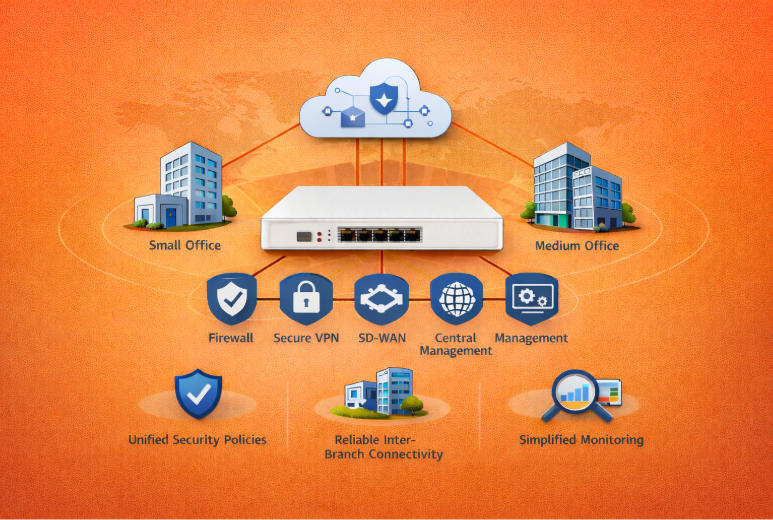
It unites firewall protection, VPN connectivity, SD-WAN routing, and security management into a single system. For small and medium businesses, it translates to homogenous security policies, stable inter-branch connectivity, and simplified day-to-day monitoring.
This guide walks IT teams through the rollout process step by step, even if you’re new to centralized network management with FortiManager or FortiAnalyzer.
Planning a Multi-Branch FortiGate Rollout
You must have a solid plan before installing any hardware. The success of any rollout begins with understanding each branch’s requirements, selecting the appropriate equipment, and building a scalable network. Headaches are avoided through planning.
Network Assessment
Begin by assessing each site’s bandwidth, traffic patterns, and the readiness of its existing hardware. The requirements for branches differ. Branch A may experience high POS traffic, with dozens of transactions per hour, whereas Branch B may handle office equipment such as computers and printers.
Document these key factors for each site:
- What applications run daily, and their bandwidth needs
- How many users connect and during what hours
- Whether existing internet connections can handle additional security processing
- Current hardware limitations or compatibility issues
This assessment helps you right-size your FortiGate deployment and avoid costly mistakes.
Hardware Selection
It is important to select an appropriate FortiGate model based on branch size, user load, and long-term scalability. Fortinet’s current G-series appliances offer improved performance, more efficient SSL inspection, and longer lifecycle support than earlier F-series models.
A practical sizing guideline for a 10-branch rollout:
| Branch Size | Recommended Model (Current) | Typical Users | Best For |
|---|---|---|---|
| Small | FortiGate 60G / 70G | 10–25 users | Retail outlets, small offices |
| Medium | FortiGate 90G | 25–100 users | Regional offices, warehouses |
| Large / HQ | FortiGate 120G / 200G | 100+ users | Headquarters, data hubs |
- Number of active users and application mix
- Growth expectations over the next 2–3 years
- Internet connection types (fiber, broadband, dual-WAN)
- Budget per location and operational requirements
Architecture Design
Your network topology shapes how branches communicate. Hub-and-spoke designs direct all traffic to a central headquarters, which is easier to manage but creates a single point of failure. Full-Mesh topologies allow branches to be directly interconnected to enhance performance, but they also increase complexity.
Most businesses benefit from SD-WAN best practices that automatically route traffic based on performance and availability. Segment your network properly with these zones:
- Staff network – Employee devices and workstations
- Guest Wi-Fi – Visitor access with internet-only permissions
- POS systems – Payment terminals isolated for compliance
- IoT equipment – Cameras, sensors, and smart devices
This segmentation identifies security threats, making troubleshooting easier.
Centralized Management
Managing multiple firewalls individually increases configuration drift and operational risk. FortiManager, combined with FortiCloud, enables centralized policy deployment, firmware management, and configuration consistency across all branches from a single interface.
FortiAnalyzer complements this by collecting logs, generating compliance reports, and providing security analytics across the entire deployment. Together, they reduce administrative overhead and allow IT teams to focus on proactive security management rather than repetitive configuration tasks.

Implementing and Validating FortiGate Across Branches
Planning is done. Now comes the actual deployment. You’ll prepare devices, coordinate with branch teams, and ensure everything works. A methodical approach here saves you from firefighting issues later.
Zero-Touch Provisioning (ZTP)
Zero-Touch Provisioning dramatically simplifies multi-branch deployments. Each FortiGate device is registered centrally before shipment and automatically retrieves its configuration once connected to the internet.
ZTP can be handled using:
- FortiManager for fully centralized enterprise control
- FortiCloud for cloud-assisted onboarding and remote provisioning
This approach eliminates the need for on-site firewall configuration. Local staff only need to connect power and network cables, while policies, VPNs, and SD-WAN settings are applied automatically. ZTP is especially valuable when rolling out firewalls across multiple cities or regions, reducing deployment time and operational risk.
Standardized Policy Templates
You don’t want Branch C running different security rules than Branch D. That’s how gaps happen. Build standardized policy templates in FortiManager that cover firewall rules, VPN settings, and application controls. Every location starts with the same baseline protection.
This ensures a uniform security posture and compliance across all branches. Sure, you can tweak individual rules when a branch has unique needs, but the foundation stays rock-solid everywhere. No more “wait, why is this branch configured differently?” moments six months down the line.
IP Addressing & VLAN Planning
Get your network addressing sorted before anything goes live. Sloppy IP schemes create confusion fast. Use a clear, standardized structure across all branches:
| VLAN Name | VLAN ID | Subnet | Purpose | Access Level |
|---|---|---|---|---|
| Staff | 10 | 10.1.0.0/24 | Employee workstations and devices | Full internal access |
| Guest | 20 | 10.2.0.0/24 | Visitor Wi-Fi | Internet only, isolated |
| POS | 30 | 10.3.0.0/24 | Payment terminals and card readers | Restricted, compliance-focused |
| IoT | 40 | 10.4.0.0/24 | Cameras, sensors, printers | Limited, monitored |
Keep this scheme identical across branches. When your network team looks at any location, they’ll instantly understand the layout. Troubleshooting becomes ten times easier.
Logistics and Scheduling
Timing can make or break your rollout. Nobody appreciates their internet dying during peak business hours. Ship hardware with tracking, confirm delivery, then schedule installations during quiet periods.
For retail locations, that means evenings after closing or early Sunday mornings. Office branches? Weekends are the best, or after 6 PM on weekdays. When it comes to 24/7 operations, you will need to identify maintenance hours that are least disruptive in terms of the number of staff available during those times.
Give branches at least a week’s notice. People handle brief outages better when they see them coming.
On-Site Installation Checklist
Whether you’re physically there or walking someone through it remotely, don’t skip steps:
- Unbox and check for damage
- Connect power (use a surge protector)
- Plug in the WAN cable to your internet connection
- Connect LAN cables to switches or devices
- Power on and wait 2-3 minutes
- Check LED indicators – power, WAN, and LAN should glow solid green
- Watch console messages if something looks off
Rushing through installation creates problems. A properly connected FortiGate means you won’t spend your evening troubleshooting why Branch 7 can’t reach the VPN.
Validation and Testing
Device is up. Configuration looks good. Now prove it actually works. Run through these tests systematically:
- Internal connectivity – Staff devices reach printers, file shares, and the internet?
- VPN tunnels – Branch connects to headquarters securely?
- SD-WAN failover – Unplug the primary internet line. Does backup kick in?
- Security rules – Guest Wi-Fi properly isolated from internal systems?
- Critical applications – Email, CRM, and essential tools are all functioning?
Catch issues now while you’re focused and ready. Write down anything weird. Repair it and proceed to another branch. Testing is not optional-it is what ensures smooth deployments against those that are chaotic.

Monitoring Performance and Optimizing Your Network
Deployment doesn’t end when the last FortiGate comes online. Networks are living systems- they must be given continuous attention. The good news? Monitoring and optimization are manageable with the appropriate tools rather than daunting.
Centralized Visibility
This is where FortiAnalyzer steps in. You can see all that in a single dashboard, rather than 10 different firewalls where you have to log in to see the status. The health of devices, security notifications, threat activity, bandwidth consumption, everything is there.
You’ll spot patterns quickly. Branch 5 shows unusual traffic spikes every Tuesday afternoon. Or Branch 2 keeps triggering malware alerts from the same workstation. Centralized visibility means issues emerge early, so you can intervene before they become actual problems. The time that your staff spends searching for information is reduced to a minimum, and they are actually fixing things.
Performance Tuning
Your initial configuration won’t be perfect, and that’s normal. Watch how traffic flows over the first few weeks, then adjust accordingly.
SD-WAN rules may need to be tweaked based on real-world performance. Perhaps your backup internet line at Branch 4 handles video calls better than expected, so you shift more traffic there. Or certain applications may need priority routing during business hours.
Fine-tune these elements as you learn:
- SD-WAN path selection – Which link handles what traffic
- Routing policies – How branches talk to each other
- Application priorities – What gets bandwidth first during congestion
- Security inspection depth – Balance protection with performance
Small adjustments make noticeable differences. Just document what you change and why.
Routine Maintenance
Set a rhythm for maintenance tasks. Networks drift without regular check-ins. Schedule these activities monthly or quarterly:
- Firmware updates – Keep devices current with security patches
- Configuration backups – Save settings before making changes
- Security policy reviews – Remove outdated rules, add new protections
- Performance audits – Check bandwidth usage and identify bottlenecks
- Log analysis – Review FortiAnalyzer reports for emerging threats
Monthly checks keep the network secure and running efficiently. Imagine it as the process of replacing the oil in your car- boring but essential. Forget it now, and you will regret it later.

Conclusion and Next Steps
Rolling out FortiGate across 10 branches requires careful planning, consistent policy management, and ongoing visibility. With the right architecture in place, businesses can reduce risk, simplify operations, and maintain reliable connectivity across all locations.
For more complex deployments, experienced support can accelerate implementation and prevent costly missteps. Spectrum Edge helps organizations design, deploy, and manage multi-branch Fortinet environments with confidence.
With a secure and scalable foundation in place, your network is ready to support growth—while your team stays focused on running the business.