Last Verified & Updated: April 2026

Table of Contents
Transitioning to a cloud-delivered security platform is a major step for any growing organization. FortiSASE offers a robust way to protect your remote workforce and secure your network edges. But before you can roll out this powerful technology, you have to navigate the procurement process.
Buying enterprise software is rarely as simple as clicking a checkout button. Fortinet uses a user-based licensing model for FortiSASE, which sounds straightforward on the surface. However, this model comes with specific rules, limitations, and requirements that can easily catch buyers off guard.
If you want to ensure a smooth deployment, you need to understand exactly how this licensing works. This guide focuses on real-world considerations rather than just a feature list. We will walk you through the essential FortiSASE licensing rules so you can make an informed decision and budget accurately for your business.
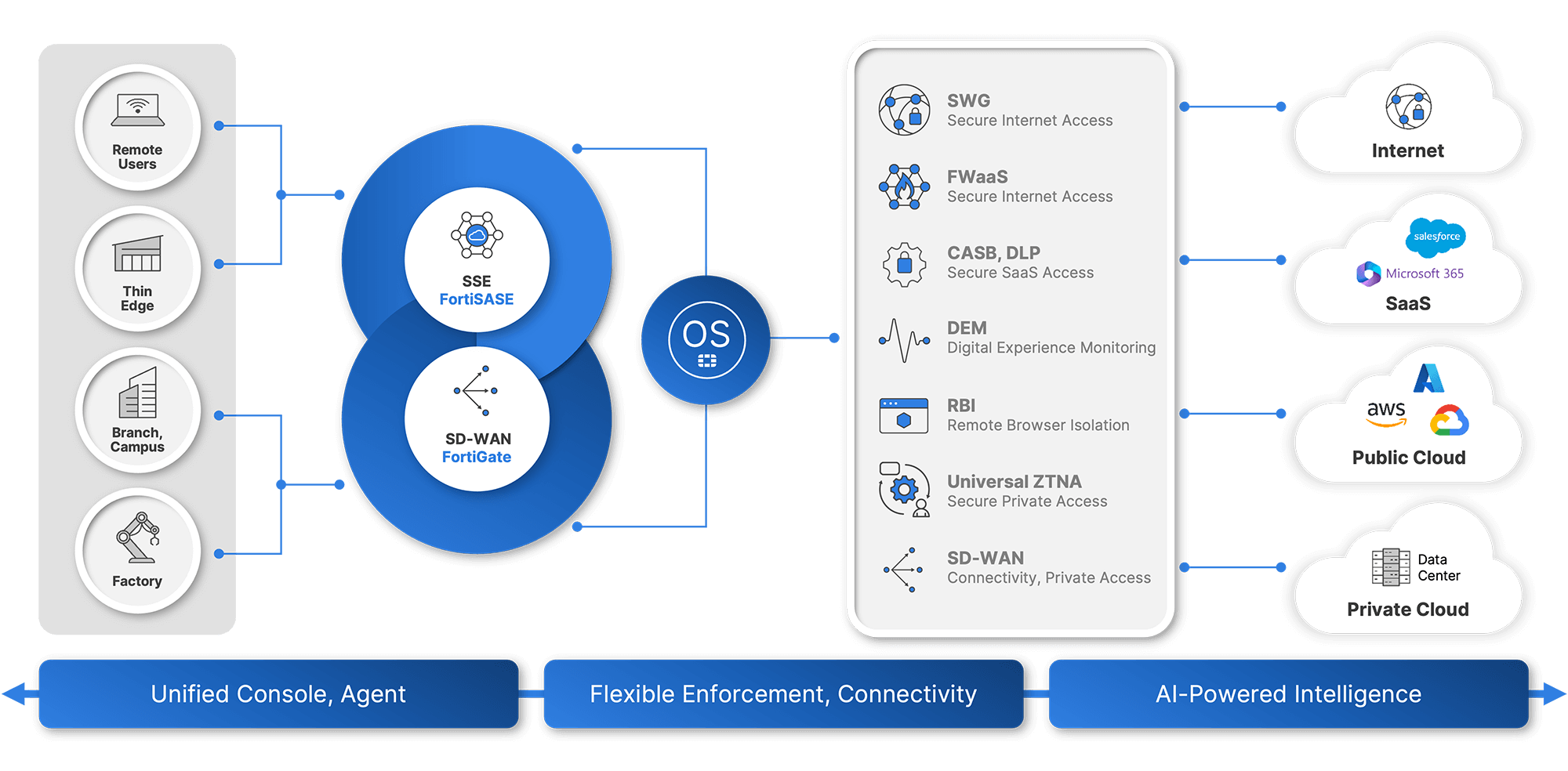
Image via Fortinet
Minimum User Requirements and Scaling Considerations
When planning your deployment, the first hurdle you will encounter is the baseline entry requirement. FortiSASE is not designed for a handful of test users.
The Minimum Entry Point
FortiSASE typically starts with a strict 50-user minimum. According to the official FortiSASE Ordering Guide, a minimum entry point of 50 users is required for all new cloud-delivered security instances. This is a fixed entry requirement, not a negotiable starting point.
Why the Minimum Matters for Businesses
This 50-user floor has significant implications for smaller businesses. You cannot easily adopt a partial deployment. For example, if you have a team of 15 people, you still have to purchase 50 licenses.
FortiSASE is typically deployed as a unified service instance, which limits partial user segmentation. As a result, smaller teams often find themselves priced out.
To address this, organizations can consider consolidating users across departments or regions to meet the minimum threshold, or planning for future growth by licensing ahead of actual headcount. In some cases, it may also be more practical to evaluate alternative solutions that offer lower entry requirements.
It is important to understand this early in the buying process to avoid wasted evaluation time. If your organization has fewer than 50 users, you will likely need to either optimize your licensing strategy or budget for the minimum tier regardless of actual usage.
How Bandwidth Allocation Works in FortiSASE
Network performance is a top concern for any remote workforce. Fortunately, FortiSASE handles bandwidth in a way that benefits highly active teams.
Pooled Bandwidth Model
Instead of capping each individual person, FortiSASE utilizes a shared company bandwidth pool. Each user license you purchase contributes 1.5 Mbps to this overarching pool.
How Bandwidth Is Shared Across Users
To understand how this works, let us look at a quick example. If you purchase licenses for 100 users, your organization receives a shared pool of 150 Mbps (100 users x 1.5 Mbps).
Because employees rarely consume maximum bandwidth simultaneously, the unused bandwidth from inactive users is automatically redistributed. If half of your team is offline or performing low-bandwidth tasks, the other half has access to a much larger pipe for data-intensive activities.
Why This Model Improves Performance
This shared allocation offers greater flexibility for power users and peak usage periods. A fixed per-user limit would throttle an employee trying to download a large file, even if the rest of the network was completely idle. By pooling the bandwidth, FortiSASE ensures a smoother, faster experience for your entire workforce.
Licensing Tiers and the Stacking Rule
Choosing the right feature set is important, but you also need to know how Fortinet structures its tiers.
| Feature | Standard | Advanced | Comprehensive |
|---|---|---|---|
| Secure Internet Access (SIA) | Included | Included | Included |
| Secure Private Access (SPA) | Included | Included | Included |
| Dedicated Public IPs (4 Included) | Included | Included | Included |
| ZTNA Posture Check | Included | Included | Included |
| SaaS App Control (CASB) | N/A | Included | Included |
| Remote Browser Isolation (RBI) | N/A | Included | Included |
| Digital Experience Monitoring | N/A | N/A | Included |
| 24/7 FortiCare Support | Included | Included | Included |
No Mixing of License Tiers
FortiSASE offers different subscription levels, most notably the Standard and Advanced tiers. A crucial rule to remember is that you cannot mix license tiers within a single instance. You cannot buy 40 Standard licenses for your general staff and 10 Advanced licenses for your IT team.
Impact on Cost and Planning
This stacking rule heavily impacts your total cost of ownership. If even one user in your organization requires the features included in the Advanced tier, you must upgrade all 50 (or more) users to that higher tier. You must evaluate your team’s requirements holistically to ensure you are not forced into a sudden, expensive upgrade later.
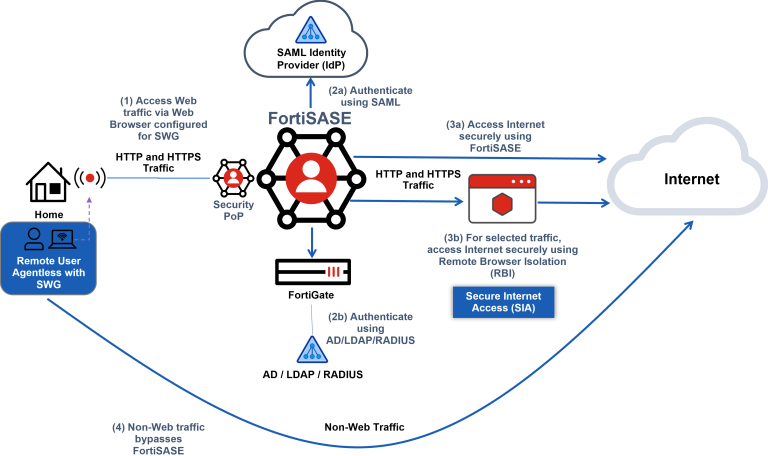
Image via Fortinet
When Upgrading to Advanced Makes Sense
So, when should you pay for the higher tier? Upgrading to the Advanced license often makes sense if your organization needs specialized capabilities, such as Public Cloud PoP access or enhanced secure web gateway features. If your distributed team relies heavily on complex cloud infrastructure, the Advanced tier will likely justify the additional investment.
Understanding FortiGate Hub Licensing Requirements
A common misconception is that a FortiSASE subscription covers every piece of equipment in your security architecture. This is not included in the subscription.
Separation Between SASE and Hardware Licensing
FortiSASE licensing does not include FortiGate hardware licensing. The cloud-delivered security service and your physical (or virtual) firewalls are treated as separate entities. You will need to maintain active licenses for both to keep your network fully operational.
Secure Private Access and Gateway Requirements
This separation becomes especially apparent when configuring Secure Private Access (SPA). SPA allows your remote workers to securely access internal resources hosted behind a FortiGate hub. To use SPA, the FortiGate device itself must have a valid FortiCare or FortiGuard support contract.
Why This Is Important for Buyers
Buyers often assume that the SASE license covers everything needed for remote access. Reinforce to your procurement team that users and gateways are licensed separately. Failing to renew your FortiGate support could break your Secure Private Access, even if your FortiSASE user licenses are fully up to date.
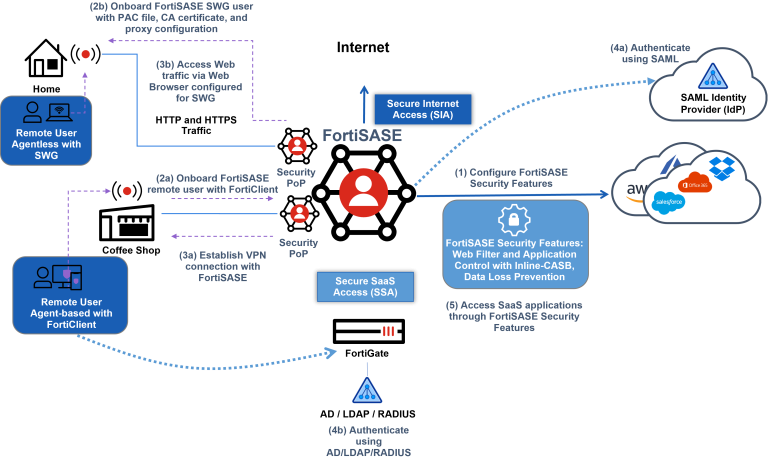
Image via Fortinet
Additional Licensing Considerations and Add-Ons
Beyond basic user counts and bandwidth, there are a few extra elements that can influence your final bill.
Identity and IP-Based Licensing Factors
Licensing often extends beyond just the users themselves. Depending on your corporate infrastructure and compliance requirements, you might need to purchase specific add-ons to integrate FortiSASE seamlessly into your daily operations.
Dedicated Public IP Add-On
A Dedicated Public IP is one of the most common requirements for FortiSASE deployments. By default, FortiSASE cloud IP addresses rotate dynamically, which is acceptable for normal web browsing but creates issues for applications that depend on IP whitelisting.
For new deployments, the Standard, Advanced, and Comprehensive licenses now include four dedicated public IP addresses. Additional IPs can be purchased as an add-on for use cases such as source IP anchoring. Technical requirements for managing these egress IPs are available in the FortiSASE Public IP Deployment documentation.
When a Fixed IP Becomes Necessary
A fixed IP becomes necessary when you rely on SaaS applications that require IP whitelisting. For instance, if your accounting system or CRM only allows logins from approved corporate IP addresses, dynamic IPs can prevent remote users from accessing these systems. Dedicated egress IP Availability depends on the subscription tier or add-on.
Hidden Costs to Plan For
You should position add-ons like the Dedicated IP as essential components for specific workflows, not just optional luxury upgrades. Encourage your IT and finance teams to factor these operational necessities into the initial budgeting phase so you aren’t surprised by hidden costs during deployment.
Key Takeaways for Businesses Evaluating FortiSASE
To summarize, here is a quick checklist of the most important licensing rules to remember:
- Minimum Entry: You must purchase at least 50 user licenses, which heavily impacts smaller teams.
- Pooled Bandwidth: Bandwidth is shared across the company (1.5 Mbps per user), rather than capped per individual.
- Uniform Tiers: You cannot mix Standard and Advanced licenses; everyone must be on the same tier.
- Separate Hardware Licensing: Your FortiGate hubs require their own active support contracts to enable features like Secure Private Access.
- Essential Add-ons: Features like fixed public IPs may be mandatory depending on your SaaS whitelisting requirements.
Is FortiSASE the Right Fit for Your Organization?
FortiSASE is an incredibly powerful tool for securing modern, distributed workforces. It is highly ideal for mid-sized to large organizations that need robust, cloud-delivered security and flexible bandwidth allocation. However, due to the strict 50-user minimum, it is generally less suitable for very small businesses or lean startups.
Understanding these licensing nuances empowers you to build an accurate budget and avoid deployment delays. If you are ready to take the next step, reach out to your vendor for a detailed sizing assessment. A proper consultation will ensure you get the exact licenses, add-ons, and hardware support you need to protect your business.